
 Skip to content
Beginning April 21, the Milwaukee County Zoo will move to license plate-based entry for all parking lots and no longer use the longstanding admission booths at the Zoo entrance.
Guests can purchase/register their parking on-site via a QR code. Payments are quick and secure using Apple Pay, Google Pay, or credit card — no app download required. Members will also register their license plate upon arrival to receive their benefit of free parking.
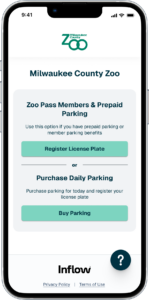
1. Select “Purchase Daily Parking”
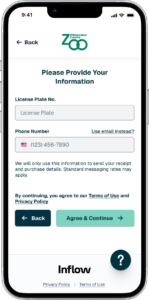
2. Enter Information
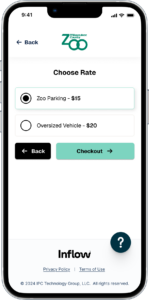
3. Select Rate and Checkout
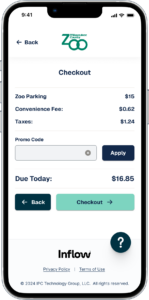
4. Submit Payment
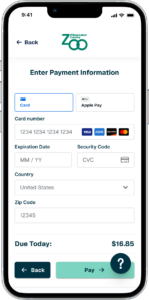
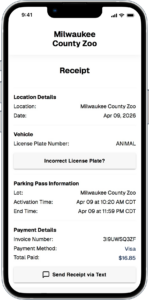
Unable to scan a QR code or don’t have a smartphone? Find one of our parking ambassadors to complete your transaction. See below for parking lot policies and additional information. Guests must either purchase parking or register their vehicle before entering the Zoo to avoid receiving a parking violation.
1. Select “Register License Plate”
2. Enter Information
3. Select “Scan Barcode” or Enter Pass Number
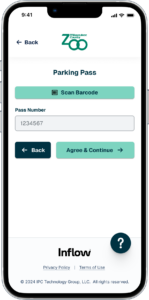
4. Scan Membership Barcode
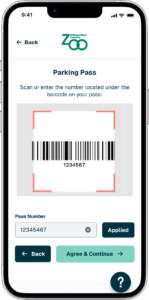
Zoo Pass Members are allowed to activate one parking session per day, per pass. Members will scan the barcode on the back of the membership card to enter the 6-7 digits member code to register their complimentary parking benefit.
Unable to scan a QR code or don’t have a smartphone? Find one of our parking ambassadors to complete your transaction. See below for parking lot policies and additional information. Guests must register their vehicle before entering Zoo to avoid receiving a parking violation.
Parking Rates:
Parking Lot Hours:
Rideshare & Drop-Offs/Pick-Ups:
Parking Lot Policies:
Avoid a Violation
Failure to activate or pay for your parking session prior to leaving may result in additional fees and a violation mailed to the address of the registered vehicle owner. Fees will escalate in relation to untimely payment and/or repeat offenses.
If you received a Parking Notice on your vehicle, follow the instructions within and register your license plate before you leave the Zoo that day. This also includes Zoo Pass Members.
If you have any questions, contact Parking Support at ZooParking@milwaukeecountywi.gov.
1. What if I didn’t pay?
Failure to register or pay for your parking session prior to leaving may result in additional fees and a violation mailed to the address of the registered vehicle owner. Fees will escalate in relation to untimely payment and/or repeat offenses.
2. How do I scan the QR code?
To scan a QR code, simply open your phone’s camera app and point it at the QR code. The camera automatically detects and decodes the QR code, displaying the associated information or link. You may need to tap a notification that appears on your screen to open the associated link.
3. What if I can’t scan the QR Code?
If you’re unable to scan the QR code to pay for parking, you can use our convenient Text-to-Pay option by texting the location code to the number posted on the signage. Need assistance with payment or registration? Locate a parking ambassador or stop by the admission booths outside the U.S. Bank Gathering Place for help.
4. My membership card isn’t working when I scan it.
Try typing in your 6-7 digits member code rather than scanning. If that doesn’t help, confirm that your membership has the free parking benefit.
5. What payment methods do you accept?
The following payments are accepted: Apple Pay, Google Pay, or credit card. Need assistance with payment or registration? Locate a parking ambassador or stop by the admission booths outside the U.S. Bank Gathering Place for help.
6. Can I prepurchase parking?
Prepaid parking will be available in late 2026. Stay tuned for updates!
Parking Customer Support
For questions or assistance related to parking, please contact: